Physics lab report template in LaTeX
Built for the physics lab: sections for deriving formulas, propagating uncertainty and fitting a straight line with least squares. Everything is in place, ready to hand in.
- Structure that matches typical physics lab requirements
- Ready environments for equations and derivations (amsmath)
- Uncertainty and linear regression section
- Measurement tables with units
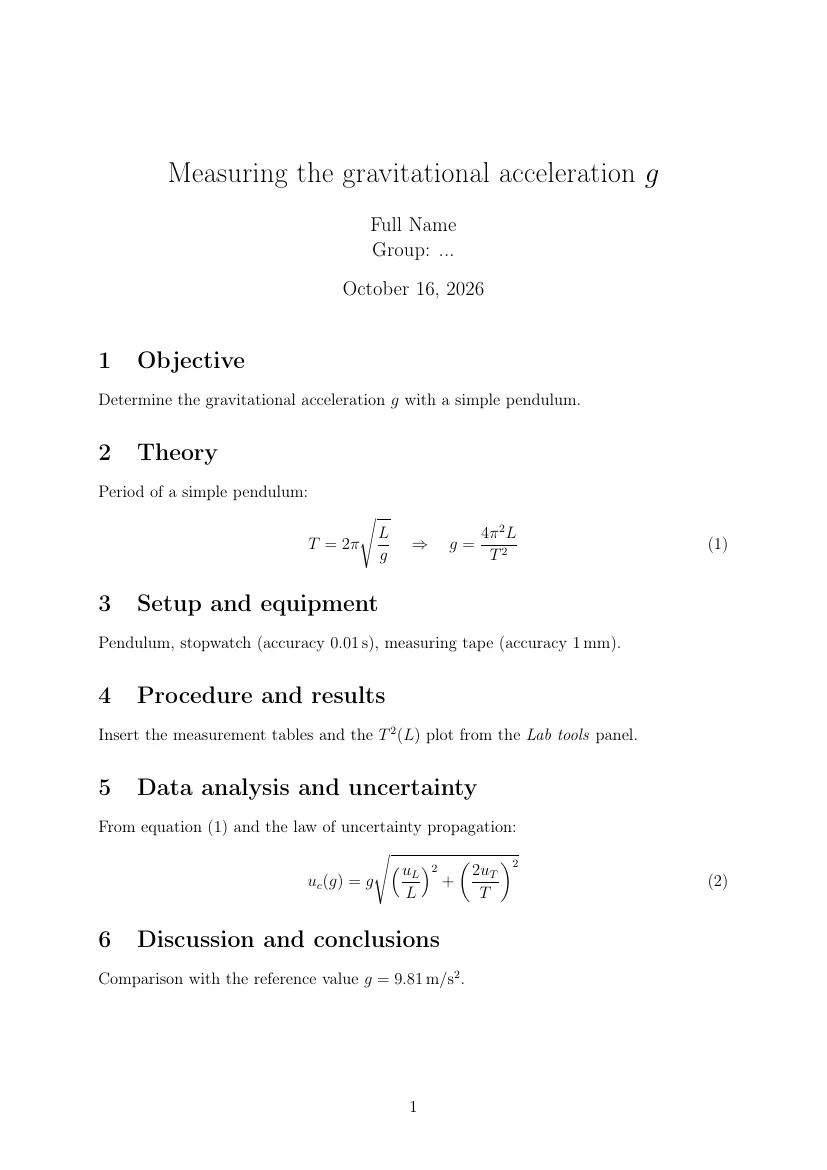
Template code
% --- CamteX: Physics lab report ---
\documentclass[a4paper,12pt]{article}
\usepackage[utf8]{inputenc}
\usepackage[T1]{fontenc}
\usepackage[english]{babel}
\usepackage{amsmath}
\usepackage{amssymb}
\usepackage{siunitx}
\sisetup{separate-uncertainty=true}
\usepackage{graphicx}
\usepackage{xcolor}
\usepackage{float}
\usepackage{caption}
\usepackage{booktabs}
\usepackage{pgfplots}
\pgfplotsset{compat=1.18}
\usepackage[hidelinks]{hyperref}
\usepackage[margin=2.5cm]{geometry}
\title{Measuring the gravitational acceleration $g$}
\author{Full Name \\ Group: ...}
\date{\today}

\begin{document}
\maketitle

\section{Objective}
Determine the gravitational acceleration $g$ with a simple pendulum.

\section{Theory}
Period of a simple pendulum:
\begin{equation}\label{eq:g}
  T = 2\pi\sqrt{\frac{L}{g}} \quad\Rightarrow\quad g = \frac{4\pi^2 L}{T^2}
\end{equation}

\section{Setup and equipment}
Pendulum, stopwatch (accuracy \SI{0.01}{s}), measuring tape (accuracy \SI{1}{mm}).

\section{Procedure and results}
Insert the measurement tables and the $T^2(L)$ plot from the \emph{Lab tools} panel.
% The plot from the panel has the label fig:reg, so in the text: Figure~\ref{fig:reg}.

\section{Data analysis and uncertainty}
From equation~\eqref{eq:g} and the law of uncertainty propagation:
\begin{equation}
  u_c(g) = g\sqrt{\left(\frac{u_L}{L}\right)^2 + \left(\frac{2u_T}{T}\right)^2}
\end{equation}

\section{Discussion and conclusions}
Comparison with the reference value $g = \SI{9.81}{m/s^2}$.

\end{document}
Don't type math by hand.
Snap a photo of your handwritten notes or draw a formula, and CamteX AI turns it into LaTeX and inserts it into your document. 3 scans without an account, then 10 every month on the free plan.
How to use this template?
- "Open in CamteX" loads the template into the editor in your browser, and "Open in Overleaf" creates a new project with it.
- You can also copy the code and paste it into your own document.
- Fill in your details and content: the structure and preamble are ready.
- Compile to PDF.
Frequently asked questions
- Which packages does this template use?
- inputenc (UTF-8 encoding of the source file), fontenc (T1 fonts, so accented characters copy and hyphenate correctly), babel (document language: section names, the date and hyphenation), amsmath (multi-line equations, \dfrac and matrices), amssymb (extra math symbols), siunitx (numbers and SI units via \num and \SI), graphicx (images via \includegraphics), xcolor (text colors), float (a table or figure exactly in place with [H]), caption (the style of table and figure captions), booktabs (clean table rules), pgfplots (plots from measurement data), hyperref (clickable references in the PDF), geometry (page margins). All of them ship with TeX Live and Overleaf, so there is nothing to install.
- How do I compile this template?
- With pdfLaTeX, the default on Overleaf and in TeX Live. The document uses the article class (A4 paper, 12 pt font), and the babel package sets the language to English.
- Can I edit the template without installing LaTeX?
- Yes. "Open in CamteX" loads the template into the editor in your browser, and a TeX Live server builds the PDF (with a free account). "Open in Overleaf" creates a new Overleaf project with this code.